

Seedream‑4.5 Official Release: Real-World Prompt Tests and Results
Dieser Inhalt ist noch nicht in deiner Sprache verfügbar.
Bytedance has officially released the new Doubao-Seedream-4.5 image generation model on Volcengine. After testing it with a variety of prompts and reference images, Seedream-4.5 feels like a solid, production-ready upgrade over Seedream 4.0, especially for editing, multi-image composition, and design use cases such as posters and logos.
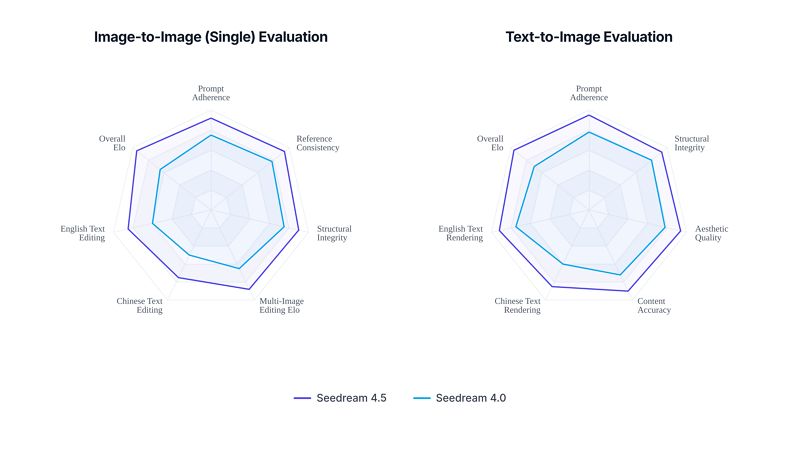
Seedream 4.5 vs Seedream 4.0 (Internal evaluation for reference)
Below is a concise review from a product testing point of view.
What Is Seedream-4.5?
Doubao-Seedream-4.5 is Bytedance’s latest image creation model, available on Volcengine (Volcano Engine). It is designed for:
- Multi-image composition and character continuity
- High-fidelity photo editing with strong detail and tone preservation
- Portrait beautification and small-face handling
- Clear small-text generation for posters, UI, and branding
- Better visual aesthetics and stronger reasoning for complex prompts
Compared with Seedream 4.0, version 4.5 aims to be both more controllable for editing and more creative for concept art and design.
1. Multi-Image Composition: Stable Character Continuity
One of the biggest upgrades is multi-image composition. In our tests, Seedream-4.5 reliably recognized the main subject across several input images and kept that subject visually consistent.
Test 1: Background replacement with multiple references
Prompt: “Replace the background of woman in image 1 with the seaside from image 2, and add two hot air balloons from image 3 in the sky.”
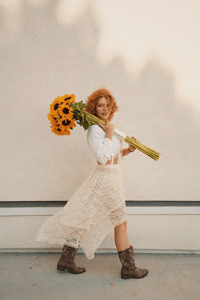
Reference image 1
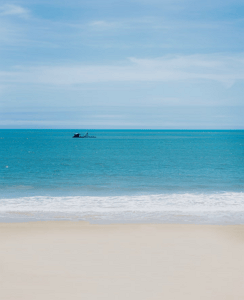
Reference image 2

Reference image 3
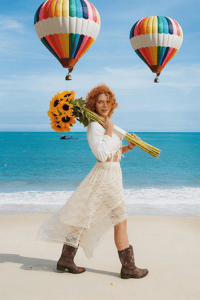
Result image
Result: The model kept the woman’s face, hairstyle, and clothing highly consistent with the source. The seaside background and hot air balloons blended naturally, with lighting and color adjusted to a coherent scene instead of looking copy-pasted.
Test 2: Merge multiple people into one scene with a reference style
Prompt: “Using the style of image 4, combine the characters from images 1, 2, and 3 into a single image.”
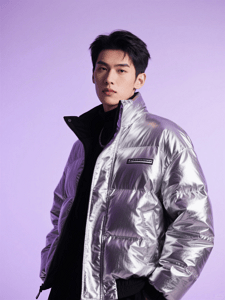
Reference image 1
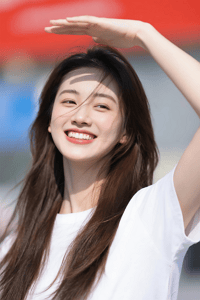
Reference image 2
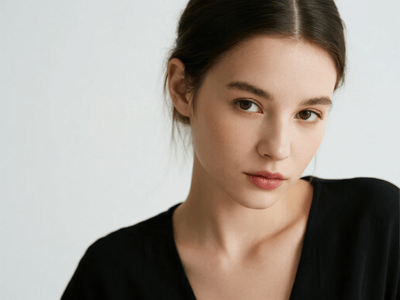
Reference image 3
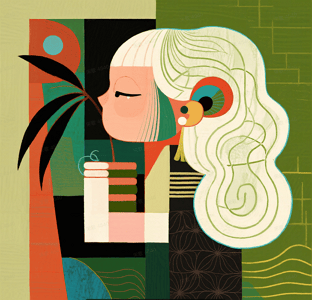
Reference image 4
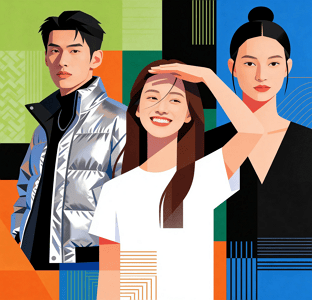
Result image
Result: Seedream-4.5 did well at preserving each person’s identity and expressions while unifying them into the target style. Skin tone, clothing, and posture were preserved, but the overall color palette, lighting, and texture matched the reference image’s style. Character continuity was noticeably more stable than typical multi-image models that often change faces or distort proportions between renders.
Overall, for creative workflows that need multiple reference images (moodboards, character sheets, product shots), the multi-image capability of 4.5 feels mature and reliable.
2. Extreme Original-Image Preservation: Faces, Lighting, and Details
Seedream-4.5 is also positioned as a strong editing model. In direct tests, it clearly improved over Seedream 4.0 in how well it keeps the original face, lighting, and detailed structure.
Subject consistency in portraits
Example prompt:
“Using image 1 as reference, generate a realistic street photography portrait: modern city street background, daytime, strong atmosphere, subject looking at the camera, natural light, clean background.”
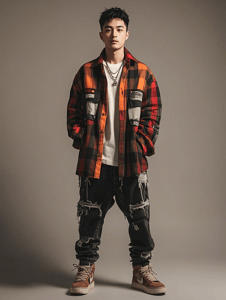
Reference image
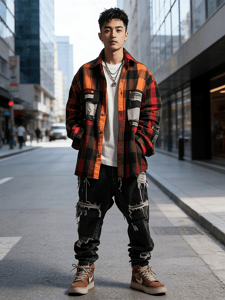
Result image
Result: The generated image stayed very close to the original person’s facial structure and features. The lighting direction and skin tone remained consistent with the original, while the background and framing were updated as requested. The output looked like a real location shoot instead of a fully synthetic face.
Editing with objects and props
Example prompt:
“Using the orange cat’s front view as reference, generate a front-facing shot of the same cat wearing blue-light-blocking glasses and a plaid shirt, sitting at a desk in front of a computer. Its paws are randomly typing on a keyboard, with coffee cups and a stack of documents around. Precisely keep the orange fur color and chubby face, with photo-level realism.”

Reference image

Result image
Result: The model preserved the cat’s fur color and face shape, and the added glasses, outfit, and office setting looked natural, not pasted on. Fur detail and lighting on the glasses were consistent with the scene, which is where many models break immersion.
Creative transformation while keeping the core object
Example prompt:
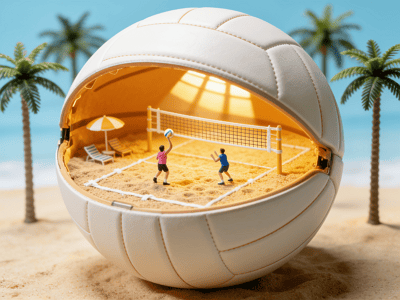
“Using the reference image’s volleyball concept, create a new creative volleyball-themed image.”

Reference image
Result image
Result: The core idea of “volleyball” and the original visual style carried over, but the model produced a fresh composition instead of a simple copy. It seems to understand the concept beyond just copying pixels.
This makes Seedream-4.5 especially suitable as a “smart retouching tool” for photography, e-commerce, and brand assets: you can ask for big changes while keeping the identity and core features of the original subject.
3. Structure & Pose Preservation: Fine-Grained Editing
When asked to edit specific parts of an image while keeping the pose and overall geometry, Seedream-4.5 showed strong control.
Material and lighting change with fixed pose
Example prompt:
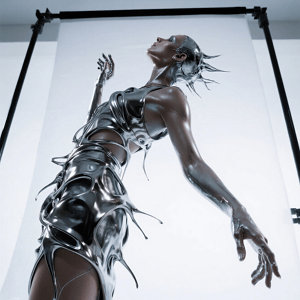
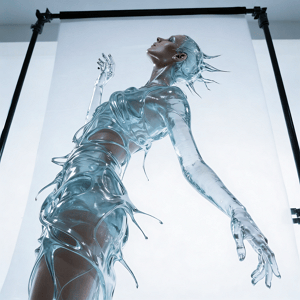
“Keep the model’s pose and the flowing shape of the liquid dress unchanged. Change the dress material from silver metal to completely transparent glass. Through the flowing water, we can see the skin details. Change the lighting from reflection to refraction.”
Reference image
Result image
Result: The pose and silhouette remained almost identical to the input. The model successfully switched the material to a glass-like look, with believable refraction and skin visibility. The fact that it preserved both pose and liquid shape while changing material and lighting is a key sign of improved editing consistency.
Adding complex background elements
Example prompt:
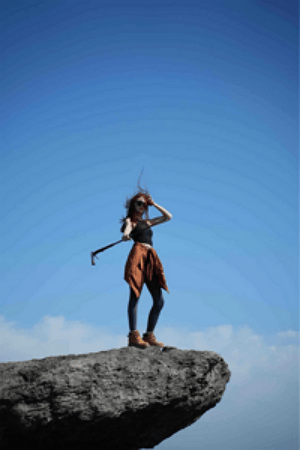
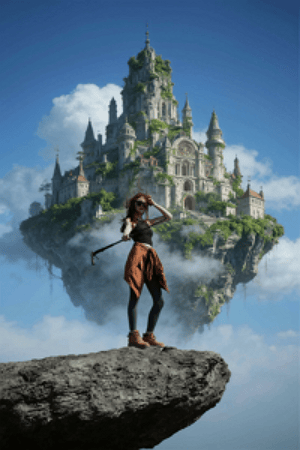
“There is a floating ‘sky city’ behind the person: a floating island castle covered in greenery, European architecture, surrounded by clouds, in a fantasy style.”
Reference image
Result image
Result: The main person stayed sharp and unchanged. The sky city integrated nicely with proper depth and atmospheric perspective, without deforming the subject or breaking edges. This balance of foreground preservation and background creativity is strong, especially for fantasy portrait posters.
These tests confirm Seedream-4.5’s strength in “surgical edits”: keep composition and pose, but change materials, environment, and effects.
4. Posters, Logos, and Small Text: Ready for Design Work
For design scenarios, Seedream-4.5 clearly targets professional layout and typography tasks.
Poster layout and branding
In our tests with poster-style prompts, Seedream-4.5 produced structured compositions with clear hierarchy: main visual, title, subtitle, and smaller copy all fit into well-balanced layouts. The framing rarely felt random, and there was a clear sense of foreground, midground, and background.
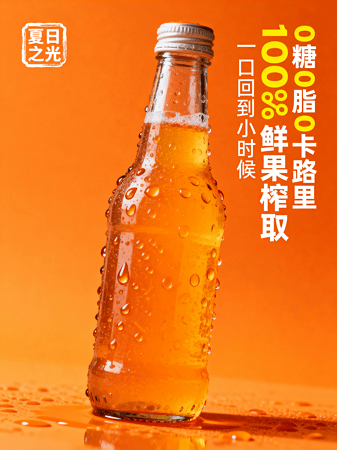
Seedream 4.5 Poster Design Example 1
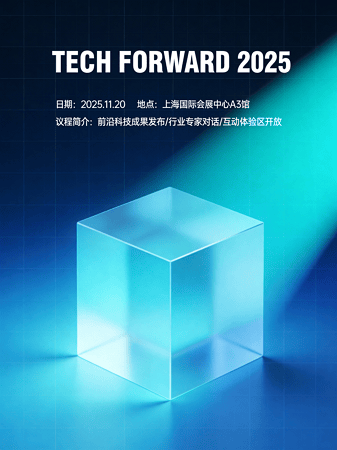
Seedream 4.5 Poster Design Example 2
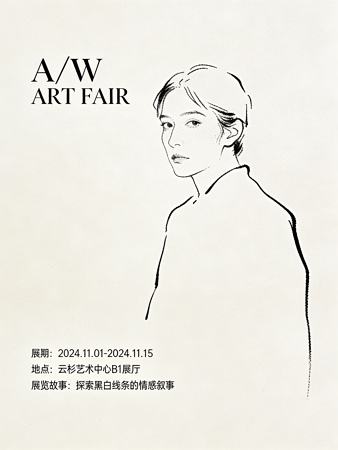
Seedream 4.5 Poster Design Example 3
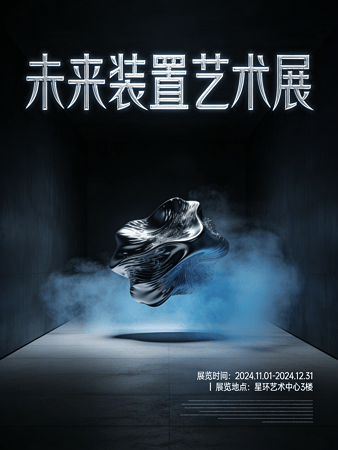
Seedream 4.5 Poster Design Example 4
Small text clarity
Example prompt:
“Illustration style poster, several black round and cute cartoon characters, with “SHH HIDE AWAY” behind, and an English story in the lower right corner”
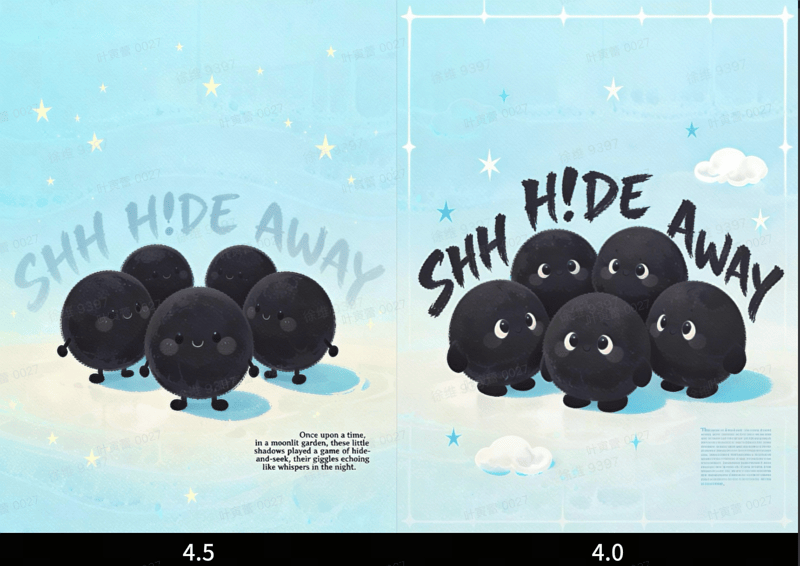
Seedream 4.5 Poster Generation with Small Texts
Result: Compared with Seedream 4.0, small text in Seedream-4.5 is more legible and less distorted. While you still should not expect fully controllable typography like a vector editor, the readability is good enough for many social media posters, marketing visuals, and mockups. For “quick design drafts” or art direction, this is very usable.
For teams that need fast visual prototypes of logos, brand visuals, and campaign posters, Seedream-4.5 offers a good trade-off between creative quality and text clarity.
5. Overall Aesthetics: Cinematic Look, Light & Shadow, Composition
From a pure image-quality perspective, Seedream-4.5 shows noticeable improvements in:
- Cinematic quality: Many outputs have a film-like look with controlled contrast and color grading.
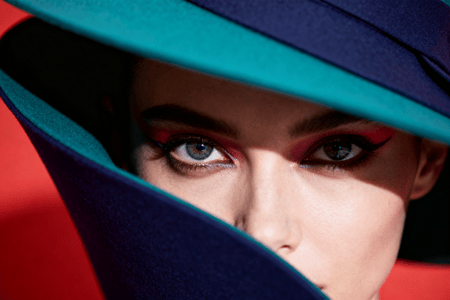
Seedream 4.5 Cinematic Look Example 1
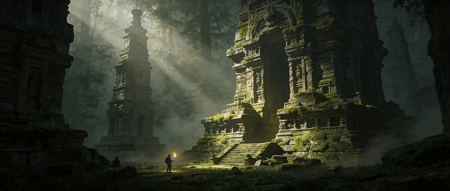
Seedream 4.5 Cinematic Look Example 2
- Light & shadow: Lighting feels more coherent with the scene. Reflections, highlights, and shadow directions are more natural, especially in metal, glass, and night scenes.
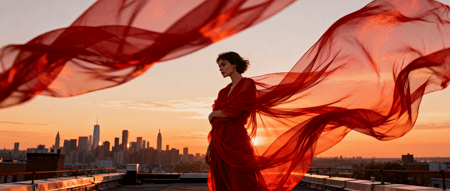
Seedream 4.5 Light & Shadow Example 1
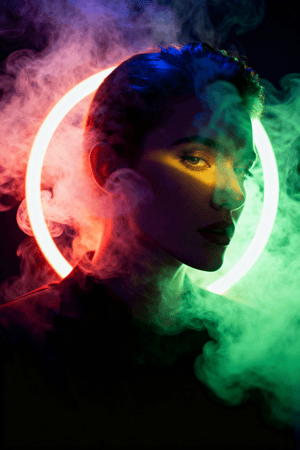
Seedream 4.5 Light & Shadow Example 2
- Composition: Framing is more deliberate. Subjects are usually placed with better balance, leading lines, and negative space. The results often look closer to professional photography or concept art than to “random AI art.”
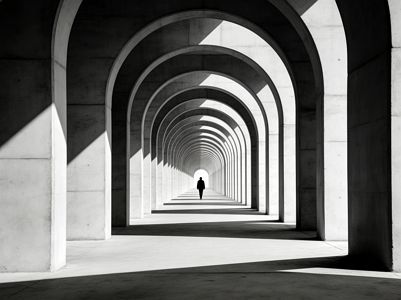
Seedream 4.5 Composition Example 1
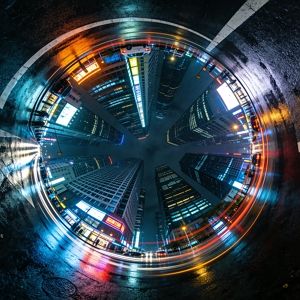
Seedream 4.5 Composition Example 2
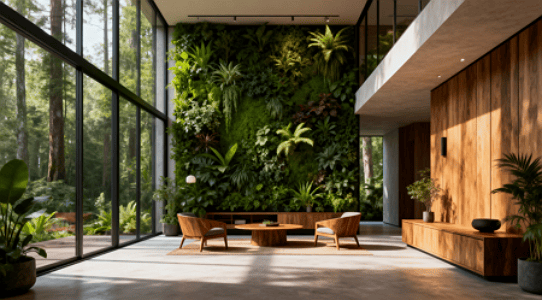
Seedream 4.5 Composition Example 3
Combined with stronger reasoning ability, Seedream-4.5 handles complex prompts that describe multiple objects, styles, and constraints in one sentence better than 4.0. It is easier to get “first try usable” images for many real production tasks.
6. How to Access Seedream-4.5
You can use Doubao-Seedream-4.5 through Volcengine’s Ark platform.
-
Service enablement: Open the Ark console and enable the service: Click here Model name:
Bytedance-Seedream-4.5 -
API documentation: Full API docs are here: https://www.volcengine.com/docs/82379/1541523
Developers can integrate Seedream-4.5 into product pipelines for:
- Image generation and editing tools
- Design and marketing platforms
- E-commerce image workflows
- Internal creative assistants and content production systems
7. Pricing and Limits
Charging is simple and based on usage:
- Pay-per-call (postpaid): 0.25 RMB per image
- Concurrency limits:
- Public test period (2025-12-03 to 2025-12-09): IPM (images per minute) limit 50
- Official release after 2025-12-10: IPM limit 500
- Higher concurrency: contact the Volcengine sales team
This pricing makes it reasonable for both individual creators and enterprise-scale pipelines, especially if you batch generate or run scheduled jobs.
8. How to Try It Now
Mew Design (recommended)
The easiest way to experience Seedream 4.5 today is through Mew Design, which has already integrated the latest model. You can generate and edit images directly in the Mew Design interface with no extra setup.
Other Volcengine entry points
If you prefer working directly with Volcengine, you can also access Seedream 4.5 via the image generation console or API. This gives you more control over advanced parameters and integration into your own workflow. Ark Experience Center: https://console.volcengine.com/ark/region:ark+cn-beijing/experience/vision?modelId=doubao-seedream-4-5-251128&tab=GenImage
You can easily test prompts like:
- Single-image generation for portraits, product shots, or concept art
- Multi-image composition using several reference images
- Editing experiments (change background, clothing, materials, or lighting)
- Poster and logo drafts with small text
Final Thoughts
Seedream-4.5 feels like a meaningful step up from Seedream 4.0. In practical tests, the model:
- Keeps faces, lighting, and details closer to the original
- Handles multi-image composition and character continuity more reliably
- Generates clearer small text for posters and UI mockups
- Produces more cinematic, aesthetically pleasing images with better composition
- Shows stronger reasoning on complex, multi-element prompts
For teams that need both creativity and control in image generation – especially for editing, branding, and design – Doubao-Seedream-4.5 is ready to be used as a serious production tool, not just a demo model.