

My Secret Playbook for Nano Banana: 8 AI Design Hacks
The following article is from guizang.
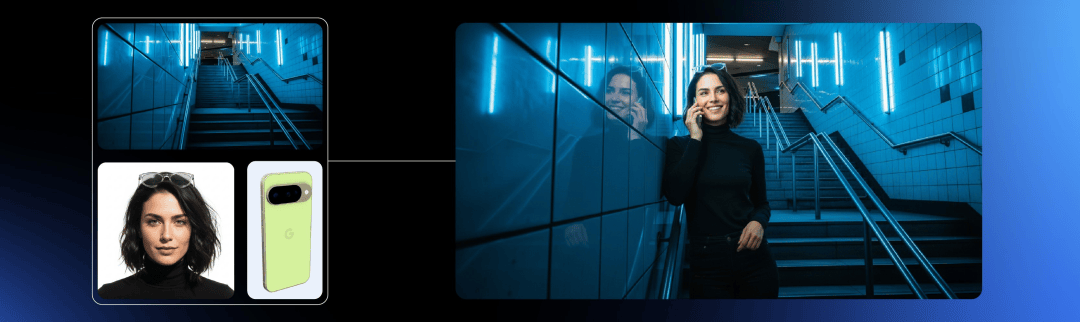
Hello everyone, this is Guizang, and today I’m going to teach you how to unlock the full potential of the most powerful image editing model out there: Nano Banana.
The image editing model we’ve all been waiting for finally dropped, and it’s a beast. After spending all night testing it, I can tell you Nano Banana is ridiculously powerful—enough to make Adobe and other editing software sweat. Complex photo manipulations that used to take forever can now be done with a single sentence.
So, let’s skip the fluff. Here’s what I’m going to teach you in this Nano Banana guide:
- Turning Nano Banana into your personal photo retoucher.
- Rescuing boring photos and making them look amazing.
- Showcasing your OOTD in a clean, creative way (and trying on new ones!).
- Using marks, boxes, and doodles to get ultra-precise results.
- Tapping into its “world knowledge” to create video effects.
- Generating entire movie storyboards from a single image.
- Turning your favorite photos into real-life stickers for your friends.
How to Get Your Hands on Nano Banana
Section titled “How to Get Your Hands on Nano Banana”First things first, let’s get you set up. I highly recommend using Nano Banana on Google’s AI Studio.
Why? Because, in a classic big-tech move, Google is leveraging its deep pockets and letting you use it like crazy, completely for free.
- Head over to AI Studio.
- On the right side of the page, switch the model to Gemini 2.5 Flash Image Preview. Yep, that’s the official name.
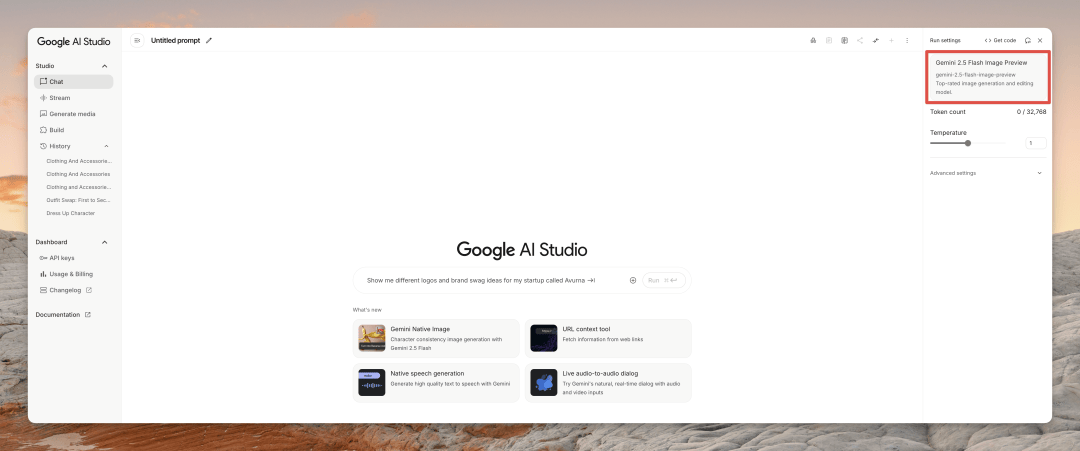
- Upload one or more images, type your request, and hit “Run.”
Besides AI Studio, some Gemini App users can also use Nano Banana now. You’ll get a pop-up notification when it’s available to you. Just switch to the Gemini 2.5 Flash model and select an image.
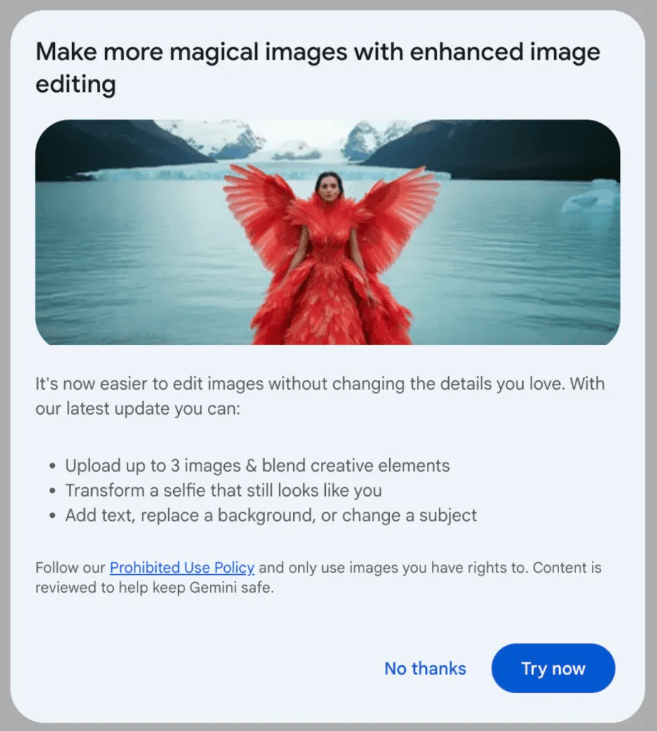
You can also find it on third-party services like FAL and Krea. Just a heads-up: there’s no official “Nano Banana” website, so don’t fall for any fakes you might see.
Pro Tip: Nano Banana supports continuous editing, but I’ve found that after four or five consecutive edits in the same chat, the performance can degrade as it hits its context limit. When that happens, just start a new session for the best results.
My 8 Favorite Nano Banana Tricks
Section titled “My 8 Favorite Nano Banana Tricks”Alright, ready to play? Here are the most powerful and creative ways I’ve found to use Google Nano Banana.
1. The Ultimate Photo Fixer-Upper
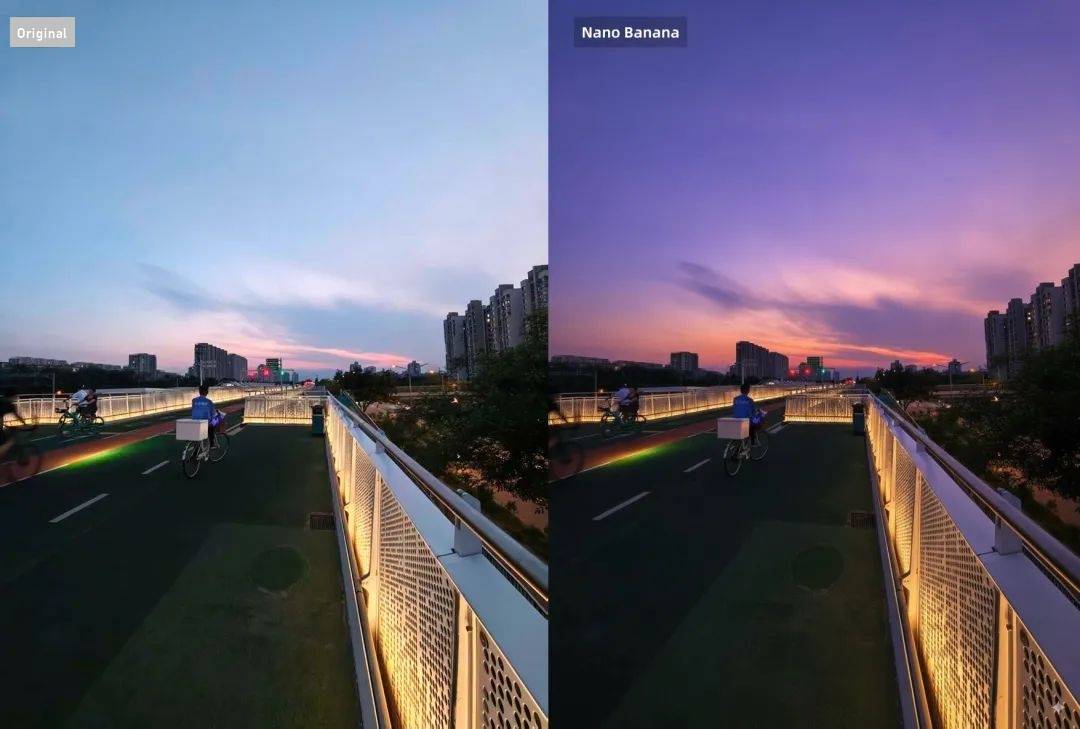
Section titled “1. The Ultimate Photo Fixer-Upper”We all take photos that don’t turn out quite right. Maybe the lighting is flat, or there’s something distracting in the background. Just feed your “bad” photos to Nano Banana with this prompt and watch it work its magic.
Prompt: This photo is very boring and plain. Enhance it! Increase the contrast, boost the colors, and improve the lighting to make it richer. You can crop and delete details that affect the composition.
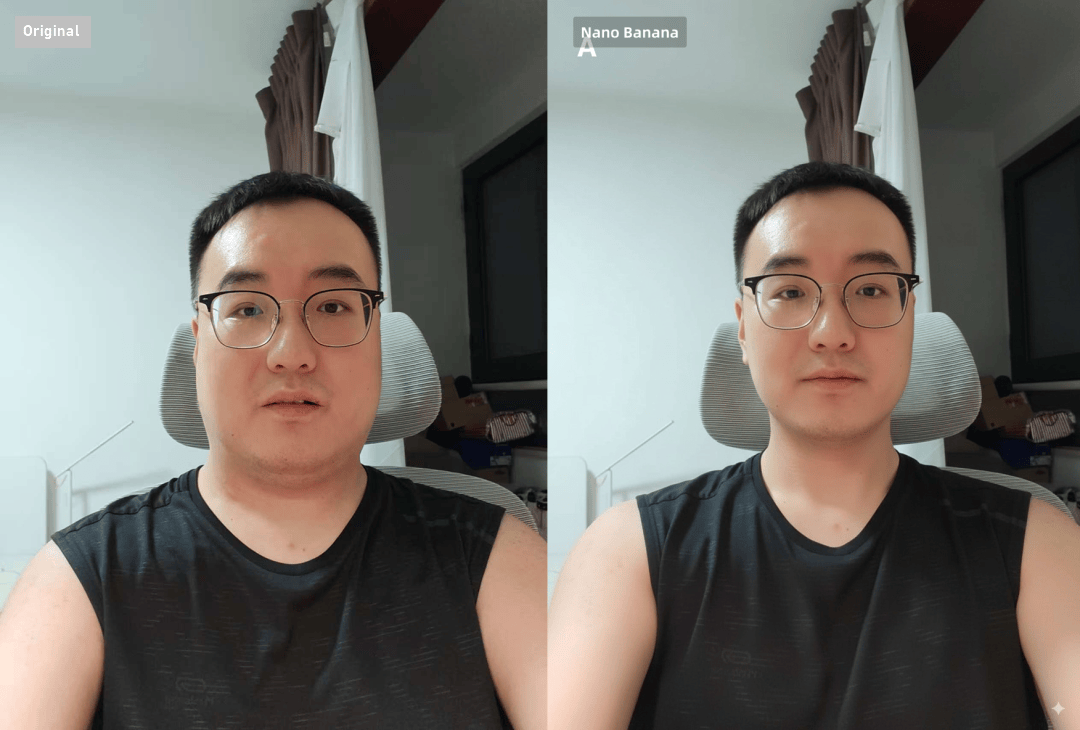
It’s also a fantastic photo retoucher. Because it does a great job of keeping faces consistent, you can ask it to make changes using natural language. I asked it to make my face slimmer, and you can see it also fixed some blemishes on my skin.
Prompt: Make the character’s face in the image slimmer, while increasing the muscle mass of the arms.
2. Your Personal AI Fashion Stylist
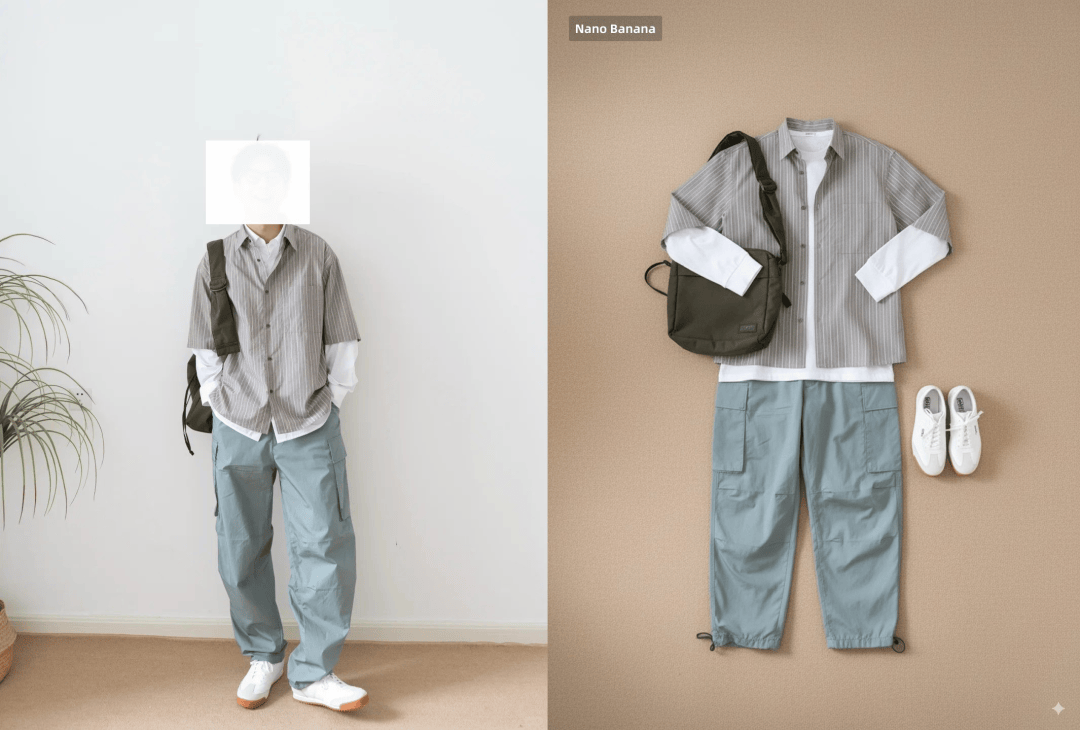
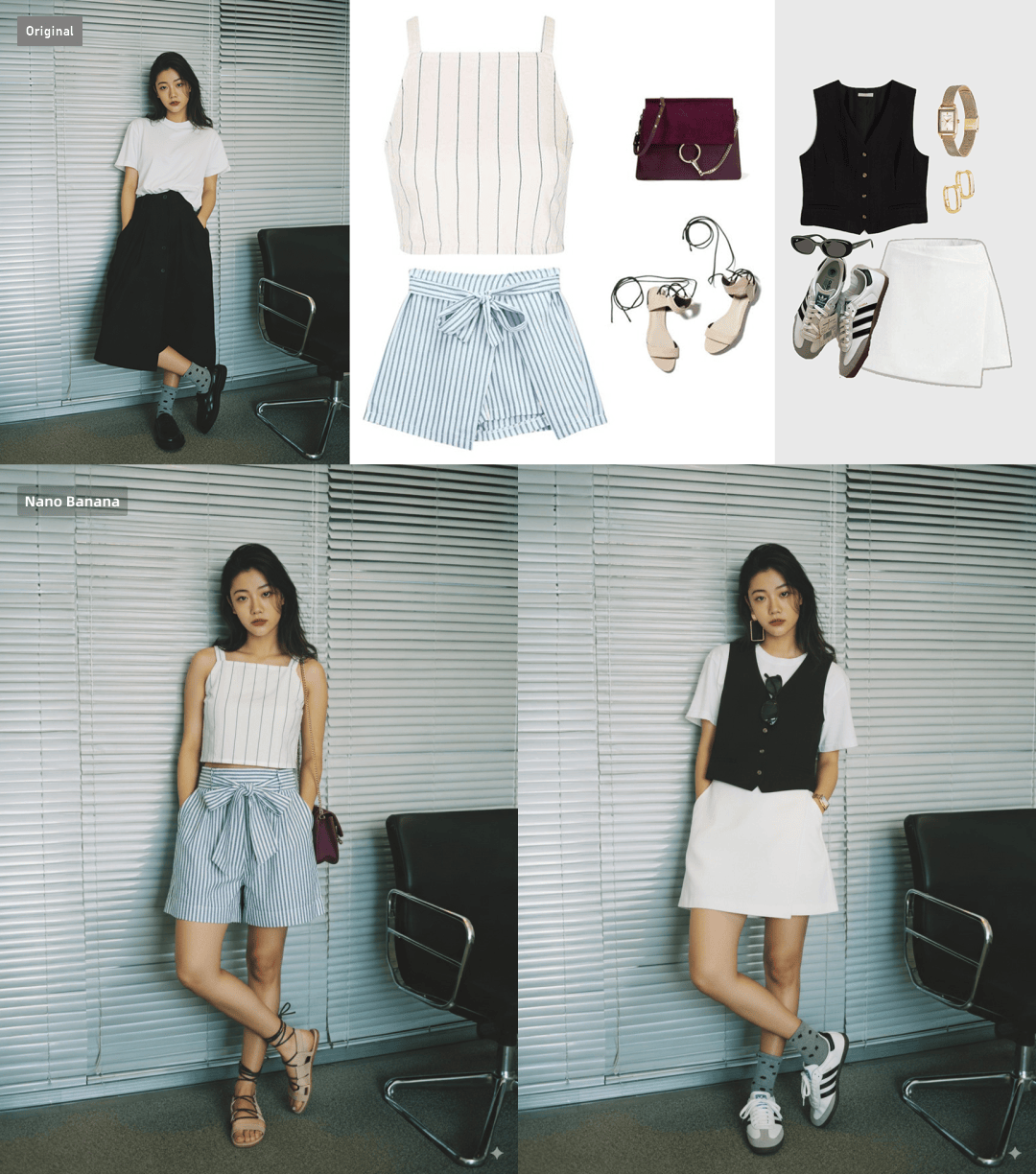
Section titled “2. Your Personal AI Fashion Stylist”This is a game-changer for fashion lovers. You can take a photo of your Outfit of the Day (OOTD) and have Nano Banana instantly create a “flat lay” image showcasing every item.
Prompt: A flat lay photograph showing all the clothing items involved in the photo.
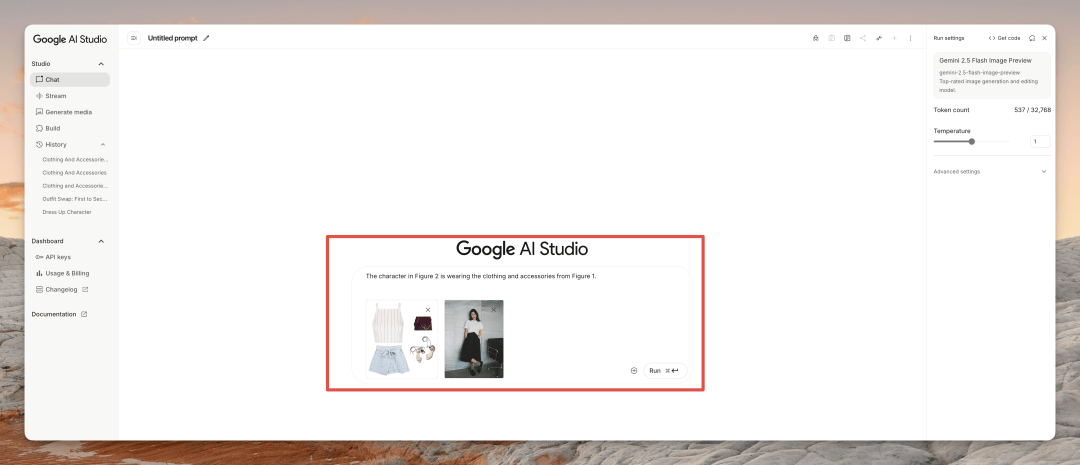
Even better, you can do the reverse! Use a picture of yourself and ask it to put you in an outfit from another blogger’s photo. The realism is incredible. Just be sure to specify which image is which in your prompt.
Prompt: The character in Figure 2 is wearing the clothing and accessories from Figure 1.
3. Take Control with Doodles & Mark-ups
Section titled “3. Take Control with Doodles & Mark-ups”This is where it gets really wild. Google Nano Banana is a multimodal model, which means you can guide it with more than just words. Draw right on the image to show it what you mean.
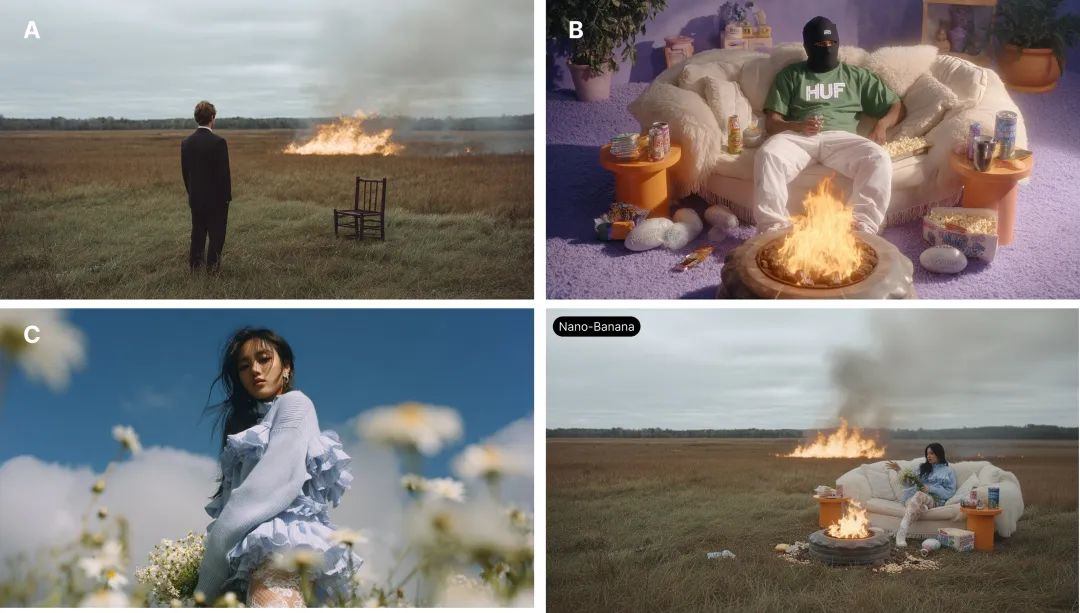
Let’s start with a basic technique. If you’re working with multiple images, you can label them to help the model better understand your text prompt. For example, I told it to combine three different images like this:
Prompt: Using the environment from A, the sofa camera angle from B, and the subject from C, create a new image that combines these three elements.
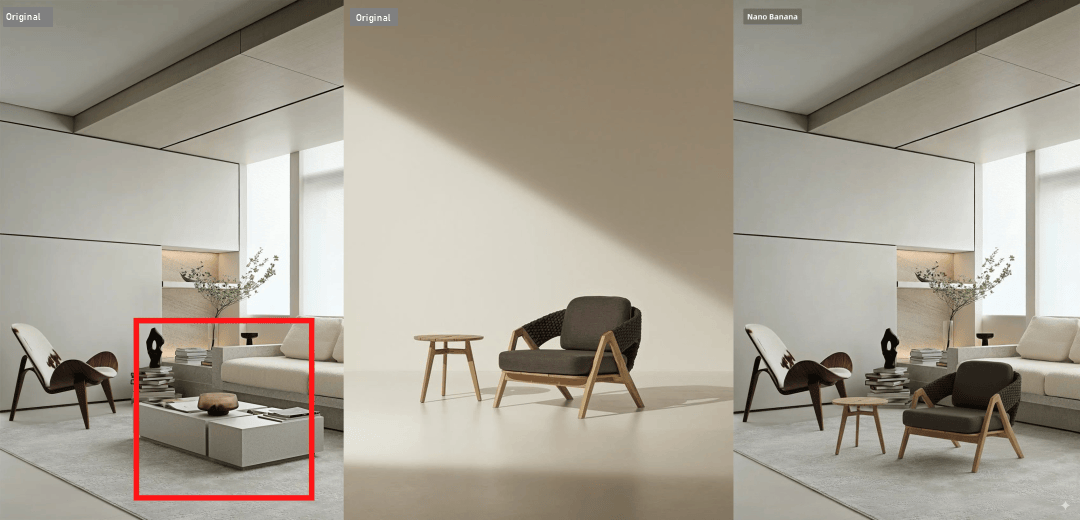
To take it a step further, you can use a box or circle to mark the exact spot you want to modify. For instance, I had it place the table and chair from a second image into a red-boxed area in the first. You can see how this is a total game-changer for e-commerce—the details and materials of the chair from Image 2 were perfectly recreated, but the lighting and color style blended seamlessly into Image 1.
Prompt: Place the chair and table from the first image at the red box location in the second image, and generate the image without the red box markings.
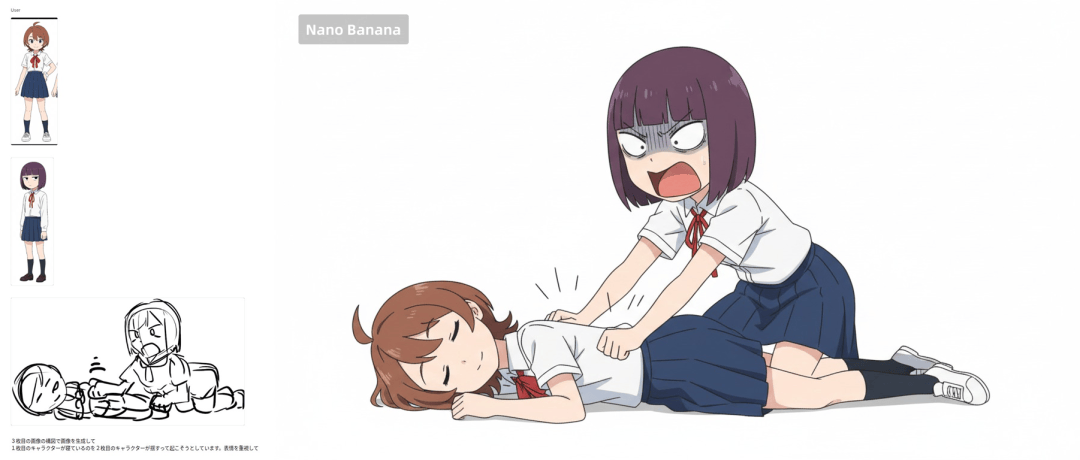
The ultimate technique is using gesture doodles. You can give it two characters and a rough scribble of them interacting, and it will generate a scene with them in that exact pose. The image below is one I ran with a quick, casual doodle.
Prompt: Have these two characters fight using the pose from Figure 3. Add appropriate visual backgrounds and scene interactions. Generated image ratio is 16:9
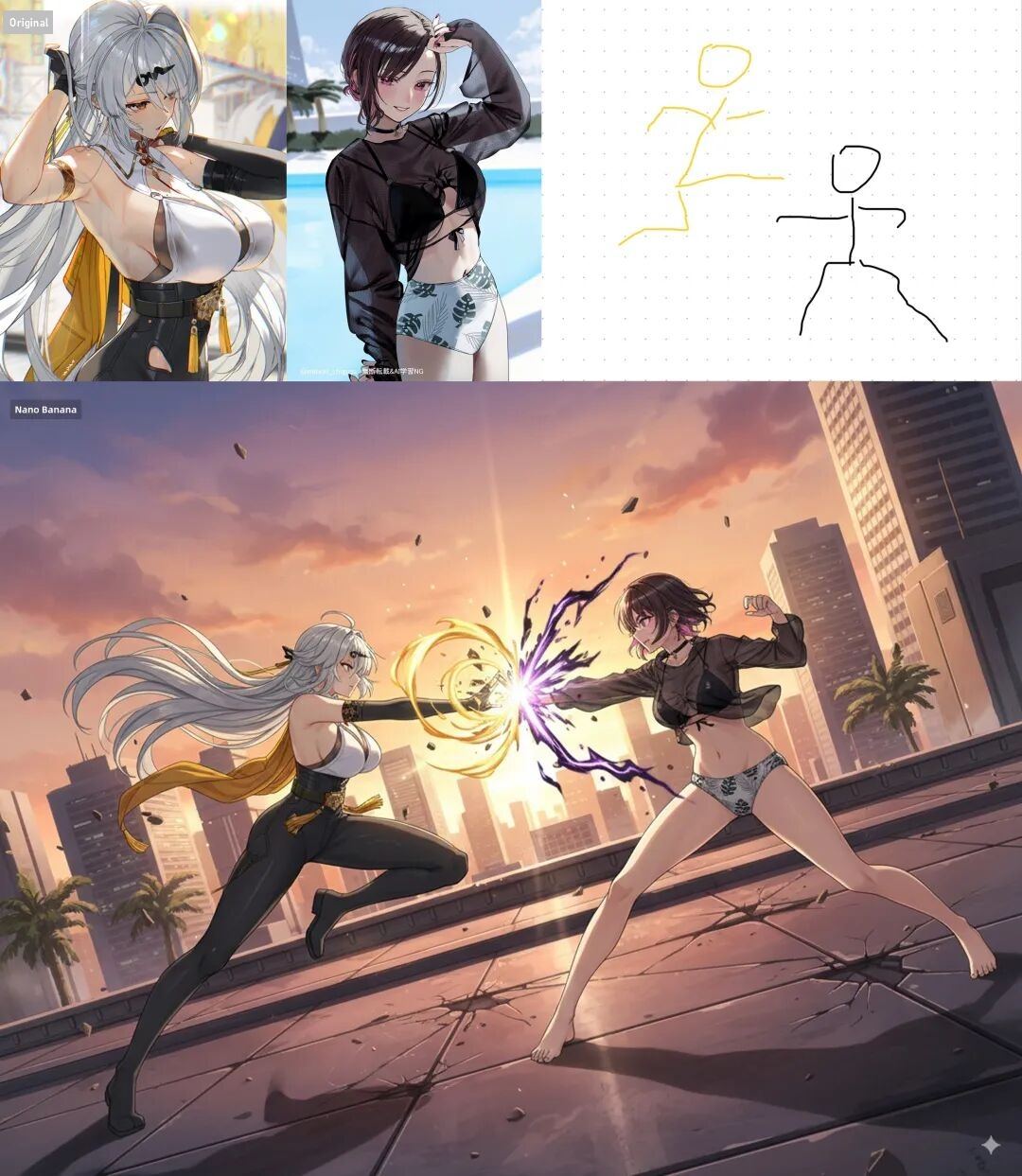
But if you draw a more detailed sketch, Nano Banana’s output will be even more precise. For example, X user minux302 created a scene where even the characters’ facial expressions were perfectly recreated from the sketch!
4. Create Movie Storyboards & Animations
Section titled “4. Create Movie Storyboards & Animations”Let’s push the last idea even further. Imagine this workflow: Same Character + Different Action Doodles + Continuous Editing.
You can generate a full sequence of storyboard panels for an action scene. Then, by feeding the first and last frames into a video model, you could generate a high-quality animated fight sequence. The potential here is massive.
5. A Game-Changer for E-commerce
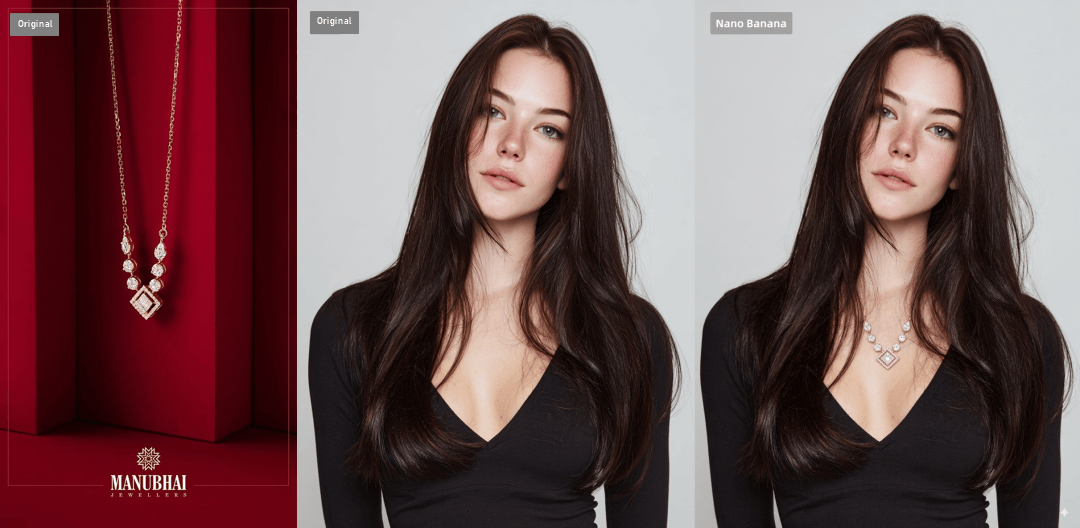
Section titled “5. A Game-Changer for E-commerce”Previous models sometimes struggled with getting the proportions of products right, especially with things like jewelry. I tested this in Nano Banana, and it’s so much better. It accurately placed the necklace from one photo onto the model in another. Sometimes it might change small details like the hairstyle, but you can easily correct that with a follow-up prompt.
Prompt: The woman in Figure 2 is wearing the necklace from Figure 1. Do not change the other details in Figure 2.
6. Turn Your Photos into Custom Stickers
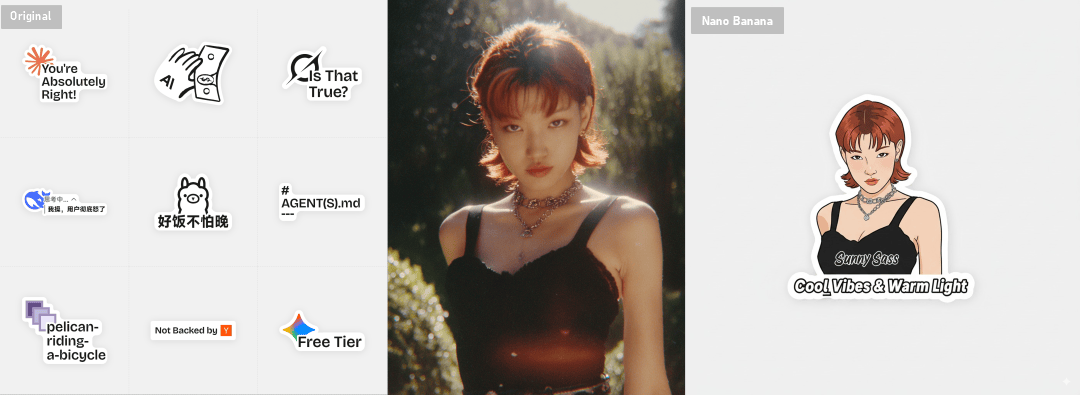
Section titled “6. Turn Your Photos into Custom Stickers”I saw someone make a bunch of stickers based on AI community inside jokes, and I loved the idea. I decided to see if Nano Banana could help me design my own based on a reference. It worked perfectly. You can get a PNG file, which is all you need to get them printed. This would be such a cool and personal gift for friends.
Prompt: Help me turn the character into a white outline sticker similar to Figure 2. The character needs to be transformed into a web illustration style, and add a playful white outline short phrase describing Figure 1.
7. Create AR-Style Informational Graphics
Section titled “7. Create AR-Style Informational Graphics”Google says Nano Banana is powered by Gemini’s “world knowledge,” so you can use that to your advantage. Try uploading a photo of a landmark and asking it to create an AR-style overlay with interesting facts. I tried it with the Taj Mahal and the Sydney Opera House, and all the information was correct.
Prompt: you are a location-based AR experience generator. highlight [point of interest] in this image and annotate relevant information about it.
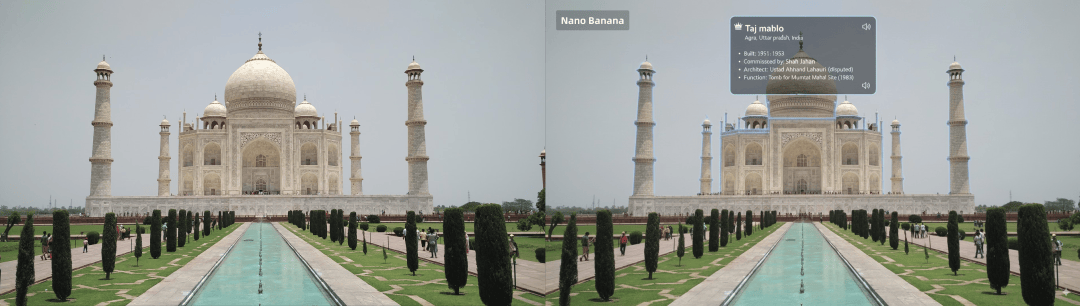
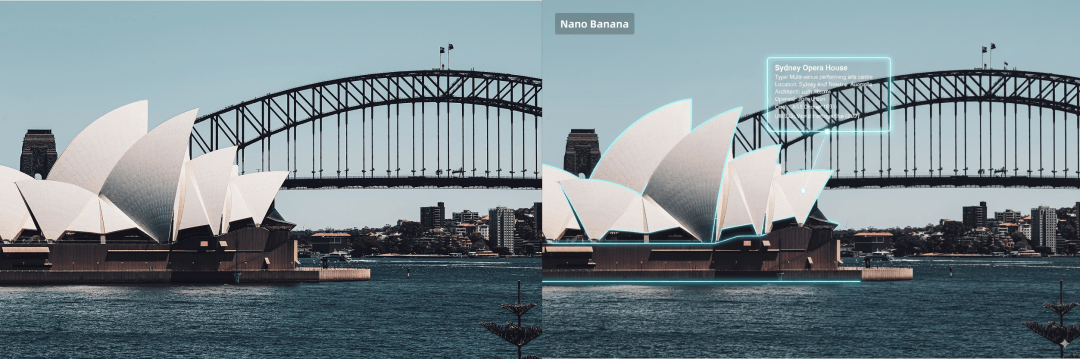
Combine these images with a video tool, add a voiceover, and you have a complete, professional-looking travel short in minutes.
8. Restore Old Photos and Anime Screenshots
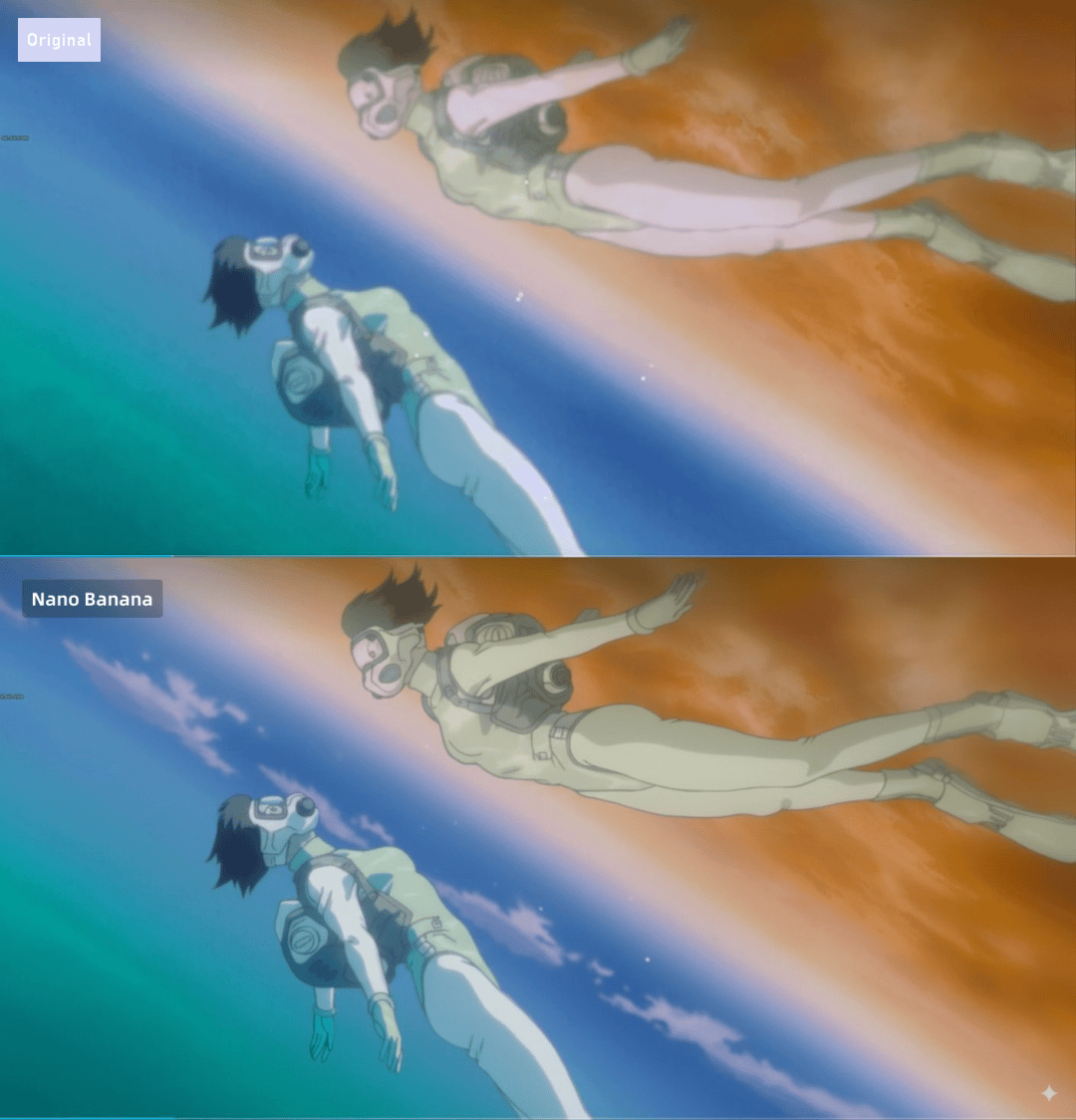
Section titled “8. Restore Old Photos and Anime Screenshots”Finally, the classic use case: photo restoration. Nano Banana does an excellent job of enhancing old, low-resolution images. I used it to restore an old screenshot from Ghost in the Shell, and it came out looking fantastic.
Prompt: Enhance the resolution of this old anime image and add the appropriate texture details, reinterpreting it with modern anime techniques.
It’s a New Era for Visuals
Section titled “It’s a New Era for Visuals”From now on, any business that relies on “visual expression” is worth rethinking with Google Nano Banana. E-commerce, marketing, education, travel, media—every single one of these fields has countless needs that can now be met more easily than ever before.
I hope this guide has inspired you. Thanks for reading, and feel free to share it with friends who might find it useful!