
跳转到内容

AI Design

2 posts with the tag “AI Design”

ChatGPT Poster Generator: How To Create Posters with ChatGPT and GPTs
chatgpt poster generator

Generated using mew.design

The rise of artificial intelligence has revolutionized poster design, and ChatGPT poster generator tools are at the forefront of this transformation. With the integration of DALL-E 3 and custom GPTs, creating posters has never been more accessible.

Whether you’re looking to craft event flyers, promotional designs, or motivational quotes, ChatGPT can help you conceptualize and create with minimal effort. In this article, we’ll walk you through how to use ChatGPT to generate posters, explore top poster GPTs, evaluate pros and cons, share expert tips and prompts, and offer a powerful alternative: Mew Design.

Way 1. Create a Poster with ChatGPT (GPT-4o)

Section titled “Way 1. Create a Poster with ChatGPT (GPT-4o)”

If you’re a ChatGPT Plus, Pro, or Team user, you can use the built-in image generation capabilities of GPT-4o (formerly DALL-E 3) to create posters. Free accounts can also generate posters but are limited to 2 generations per day.

  • Step 1. Log in to chat.openai.com. ChatGPT will automatically use the latest image generation mode if you are a subscriber or have free image generations available.
  • Step 2. Input a detailed poster prompt in the chat box. Example Prompt:

Create a vintage-style poster for a local farmers market. Use earthy tones, retro typography, and include the text: ‘Fresh from the Farm - Sundays 9am to 1pm’.
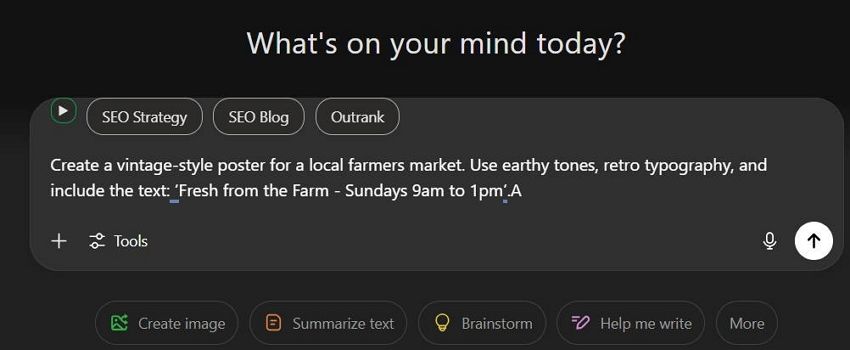
enter poster prompt to chatgpt

  • Step 3. Wait about 30s, ChatGPT will return your poster image.
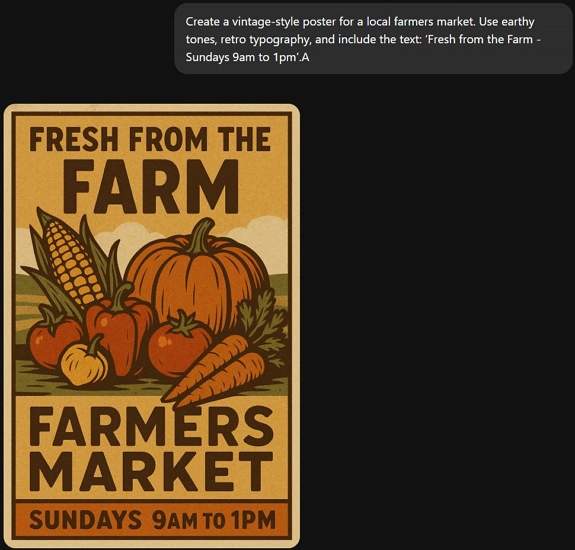
chatgpt generate poster

  • Step 4. If you’re satisfied with the ChatGPT-generated poster, click the Download icon to save it. If it’s not quite what you need, use a follow-up prompt to regenerate it.
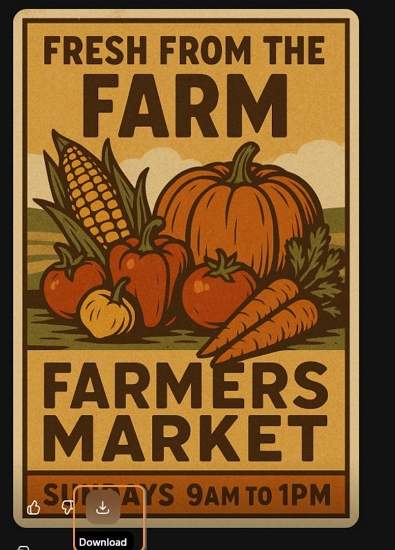
download chatgpt generated poster

Way 2. Create a Poster with Poster Generator GPTs (ChatGPT Plugins)

Section titled “Way 2. Create a Poster with Poster Generator GPTs (ChatGPT Plugins)”

If you need more customization or specialized templates, using third-party GPTs and plugins offers expanded poster generation options.

How to Use Poster Generator GPTs:

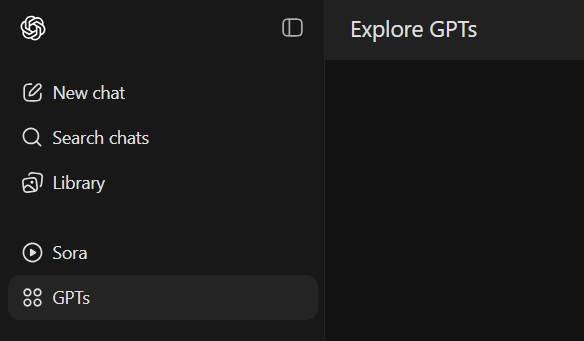
  • Step 1. Click GPTs in the sidebar.

explore gpts in chatgpt

  • Step 2. Search for keywords like “poster maker” or “poster generator”.
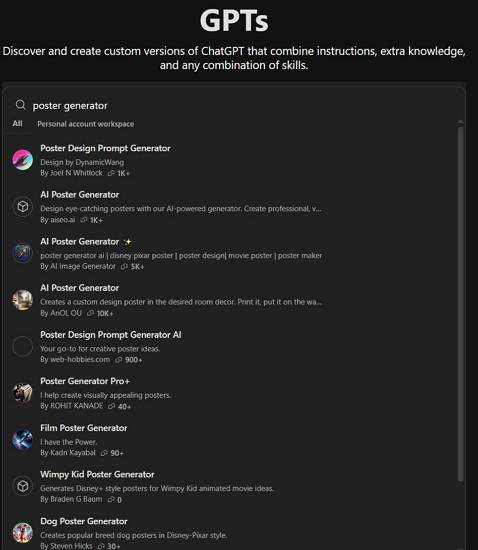
search for poster generator gpts

  • Step 3. Click into a GPT and select Start Chat.
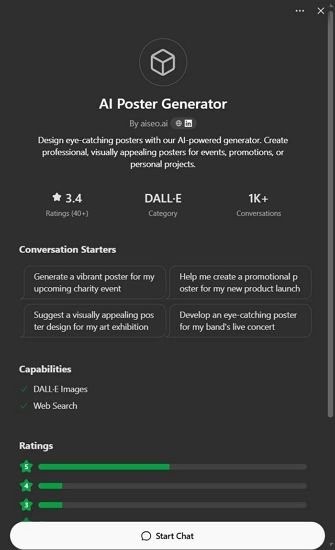
select a chatgpt poster generator plugin

  • Step 4. Begin chatting and follow prompts to to generate your poster using the selected Chatgpt plugin.

1. CanvaAI — Poster Maker / Generator GPT

Section titled “1. CanvaAI — Poster Maker / Generator GPT”

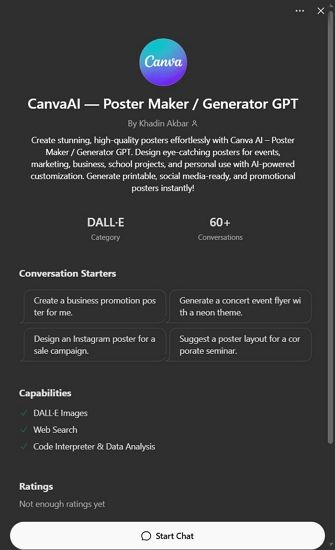
A versatile tool using DALL-E 3, CanvaAI Poster Maker / Generator GPT helps you create custom posters with your input. You can select styles like modern, vintage, or minimalist.

  • Use Case: Event flyers, brand campaigns.
  • Notable Feature: Follows instructions for fonts, layout, and colors well.
canvaai poster maker generator gpt

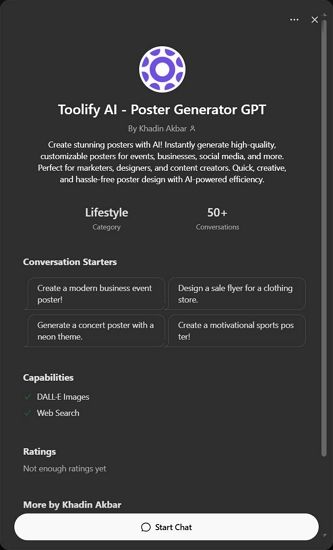
Designed specifically for generating image posters, Toolify AI Poster Generator GPT focuses on visually striking compositions based on minimal text prompts.

  • Use Case: Inspirational quotes, digital artwork.
  • Notable Feature: Clean, high-res output with image-to-text alignment.
toolify ai poster generator gpt

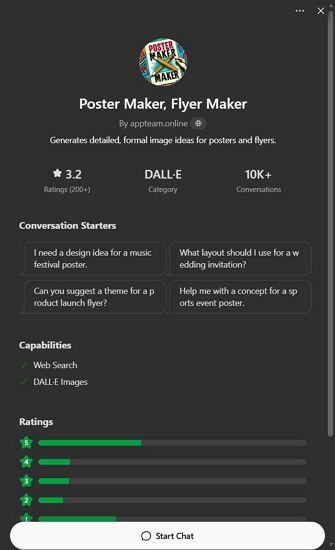
Found on the appteam.online, this GPT-style tool offers pre-configured poster templates you can modify through prompts.

  • Use Case: Marketing, education, social media.
  • Notable Feature: One-click variations and editable fields.
appteam poster maker flyer gpt

Pros and Cons of Using ChatGPT Poster Generator

Section titled “Pros and Cons of Using ChatGPT Poster Generator”

✅ Advantages

  • Easy to use with detailed prompts.
  • Fast ideation with visual + text concept generation.
  • GPT-4o produces relatively accurate poster text.

❌ Disadvantages

  • Text Rendering Issues: Poster text may appear garbled or incorrect.
  • Lack of Editing Control: You cannot move or edit individual poster elements accurately.
  • Slow Rendering: Image generation can take up to 30 seconds or more.
  • Usage Limitations: Free users get limited generations per day.

These limitations make ChatGPT great for fast drafts or inspirations, but not ideal for refined, editable, or high-accuracy poster needs. That’s why many users turn to a powerful free alternative—Mew Design.

Best Free ChatGPT Poster Generator Alternative: Mew Design

Section titled “Best Free ChatGPT Poster Generator Alternative: Mew Design”

Mew Design is an AI-powered graphic design platform where anyone can create professional-grade visual assets via natural language—without needing to learn design software. Built around the concept of “design for all,” Mew Design empowers individuals and businesses to bring their ideas to life quickly and creatively.

🚀

The Best Alternative to ChatGPT Poster Generator

Mew Design combines the power of AI Agent with specialized poster design algorithms, offering the most intuitive and powerful poster generation experience available today.

Start Creating Posters for Free

Why Mew Design Is a Better ChatGPT Alternative for Poster Creation

Section titled “Why Mew Design Is a Better ChatGPT Alternative for Poster Creation”
  • No Text Issues: Unlike ChatGPT’s image hallucinations, Mew Design uses text-to-design systems that preserve clarity—even for long content.
  • Fully Editable Posters: Generated works are code-based and can be modified precisely via natural language like “Move the logo to top left”, “Make the title bigger”, or “Change the poster style to Ghibli”.
  • Multiple AI Meow Designers (AI Agent for Design): Choose from a team of cat-themed AI designers, each with unique styles infused with human creativity.
  • Smart Understanding: Deep interpretation of both texts and visual inputs. You can upload your logo, product images, style references, and more — the Meow Designer will recognize them and incorporate them into the poster generation.
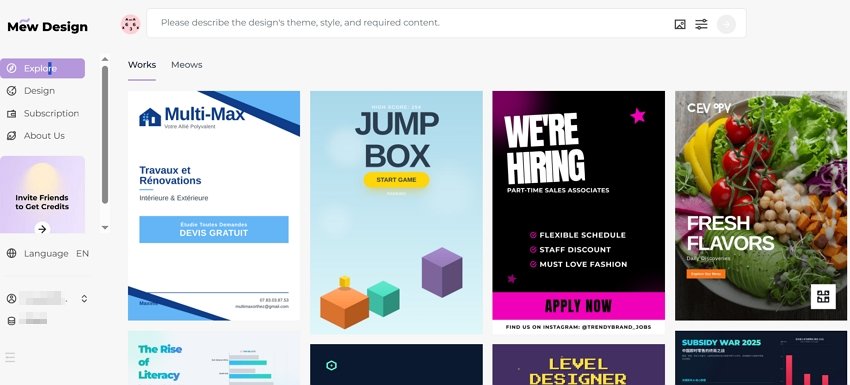
  • Step 1. Sign up for a free Mew Design account.
sign in to chatgpt poster generator alternative

  • Step 2. Select the Meow Designer that best suits your poster style or purpose.
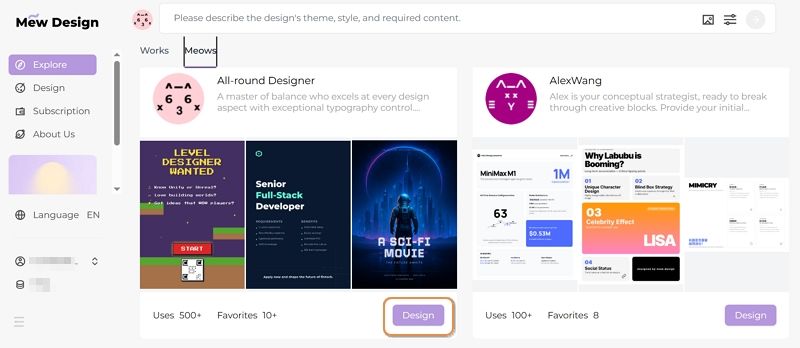
select an ai agent for poster design

  • Step 3. Enter your poster idea in the prompt area.

input prompt to chatgpt poster generator alternative

  • Step 4. Upload your reference images based on your needs.
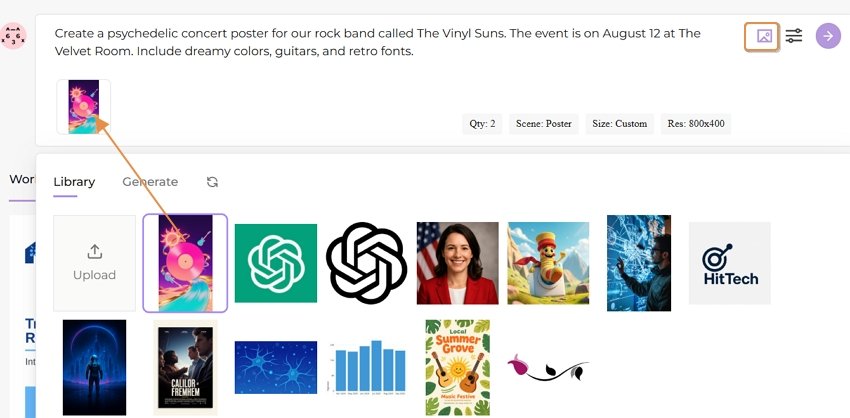
upload reference images for poster

  • Step 5. Review the poster and continue editing via follow-up prompts.
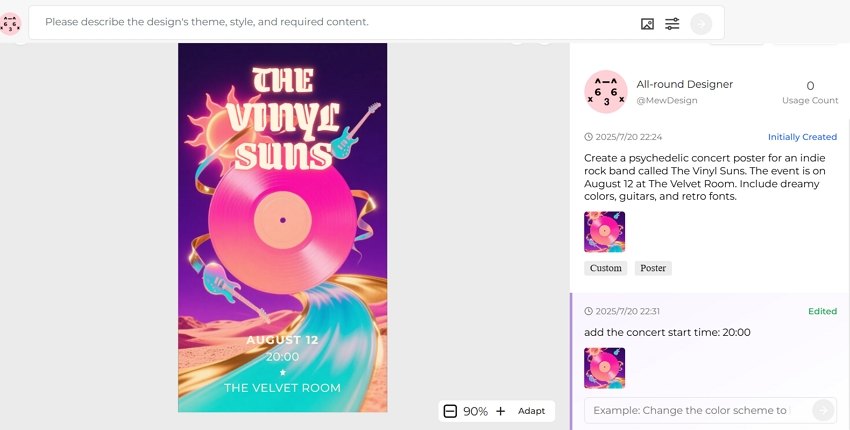
edit the ai generated poster

  • Step 6. Export or publish your poster.
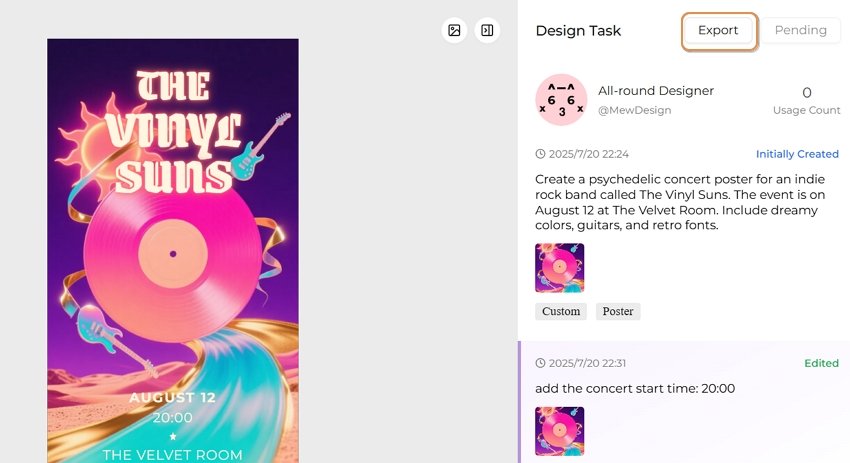
export the ai generated poster

Prompt Tips & Examples for ChatGPT Poster Generation

Section titled “Prompt Tips & Examples for ChatGPT Poster Generation”

Here are sample prompts across poster types to spark creativity on ChatGPT:

  • AI Concert Poster: “Create a neon punk concert poster for ‘Electric Rebellion Tour’ with glitch effects, electric guitars, and event details in bold font.”
  • AI Movie Poster: “Generate a thriller-style movie poster with a shadowy figure, foggy forest, and the title ‘Whispers in the Dark’.”
  • AI Hiring Poster: “Make a hiring poster for a design agency, include text: ‘We’re Hiring Designers’, use modern flat illustrations and a call-to-action button.”
  • AI Political Poster: “Create a political campaign poster for ‘Vote Lisa Chen 2025’, include patriotic symbols, bold serif font, and hopeful blue tones.”
  • AI Academic Poster: “Design a conference poster for ‘AI in Healthcare 2025’, with speaker photos, date/location, and professional academic layout.”
  • AI Educational Poster: “Generate a fun classroom poster saying ‘Science is Magic!’, with colorful illustrations of planets and microscopes.”
  • AI Sales Poster: “Create a flash sale poster for a fashion store, showing ‘70% OFF Today Only’, with red background, modern type, and price tags.”

ChatGPT Poster Prompt Best Practice Formula

Section titled “ChatGPT Poster Prompt Best Practice Formula”

[Action] + [Poster Type or Event] + [Style or Theme] + [Text] + [Color/Design Guidance] Example: “Design a minimalist poster for a tech hiring event, include ‘We’re Hiring Engineers!’, use navy blue and geometric patterns.”

Tips for Better Poster Generation with ChatGPT

Section titled “Tips for Better Poster Generation with ChatGPT”
  • Use clear instructions: specify layout, color, fonts, theme.
  • For text-heavy posters, say: “Make sure all text is readable and spelled correctly.”
  • Request variations: “Give me 3 versions of this poster.”
  • Export and edit externally if needed (e.g., Canva, Figma).

Comparison Table: ChatGPT vs Plugins vs Mew Design

Section titled “Comparison Table: ChatGPT vs Plugins vs Mew Design”
Feature/ToolChatGPT (Built-in)ChatGPT Plugins (GPTs)Mew Design
Text AccuracyMediumMediumHigh
Layout ControlLowLow–MediumHigh
CustomizabilityPrompt-based onlySome templatingFull natural edits
Editability✅ (via prompt edits)
SpeedMedium (20–30 sec)Medium–SlowFast (10–30 sec)
PricingFree (2/day) or PaidFree/GPT Plan RequiredFree (200 Credits) or subscription
Use CasesQuick ideasMarketing visualsHigh-precision, editable posters

Can I use ChatGPT poster generator for free?? You can use it with a free ChatGPT account, but you’re limited to 1–2 generations per day. Paid accounts offer more access.

Is the ChatGPT generated poster editable? No, ChatGPT images are static. You’ll need external tools to tweak designs.

Can I use these posters commercially? Yes, OpenAI allows commercial use of generated images, but avoid mimicking real artists’ styles.

Is there a ChatGPT plugin to make the posters editable? No current ChatGPT plugin offers full editing. You must export and edit elsewhere. For anyone seeking visual storytelling with precision and polish, Mew Design is a superior solution beyond what AI alone can achieve.

What’s the best resolution for ChatGPT-generated posters?? For digital use, 1792x1024 or 1024x1792 pixels is typically sufficient. For print, request high-resolution outputs and consider using upscaling tools or platforms like Mew Design for the best quality.

Can ChatGPT poster generators handle complex typography? While AI image generators have improved significantly, complex typography can still be challenging. For text-heavy designs, consider using tools like Mew Design that offer post-generation text editing capabilities.

How do I create consistent poster series with ChatGPT? Develop a detailed style guide prompt that you can reuse, specifying colors, fonts, layout principles, and visual elements. Save successful prompts and modify only the content-specific elements for each new poster in your series.

Conclusion: Revolutionizing Poster Design with ChatGPT

Section titled “Conclusion: Revolutionizing Poster Design with ChatGPT”

ChatGPT poster generators represent a fundamental shift in how we approach design creation. By combining the power of natural language processing with advanced image generation, these tools democratize professional poster design and open up creative possibilities that were previously limited to skilled designers.

Whether you choose Mew Design for its comprehensive features and ease of use, explore custom ChatGPT GPTs for specialized workflows, or experiment with direct DALL-E prompting for maximum control, the key to success lies in understanding how to communicate effectively with AI systems.

As we move forward, the integration of AI in creative workflows will only deepen, making tools like ChatGPT poster makers essential skills for anyone involved in visual communication. Start experimenting today, and discover how artificial intelligence can amplify your creative vision and streamline your design process.

🚀

Ready to Create Your First AI-Powered Poster?

Join thousands of creators who are already using Mew Design to bring their poster ideas to life with the power of ChatGPT and advanced AI technology.

Start Creating Free

Make a Picture with Words: AI Text-to-Image & Word Art Generators 2025

The art of transforming text into visual masterpieces has evolved dramatically with artificial intelligence. Whether you want to make a picture with words, create stunning text-to-image art, or design eye-catching word art, modern AI tools offer unprecedented creative possibilities. This comprehensive guide explores the best methods and tools for creating pictures from text in 2025.

What Does “Make a Picture with Words” Mean?

Section titled “What Does “Make a Picture with Words” Mean?”

Making a picture with words encompasses several creative techniques:

  • Text-to-Image Generation: Using AI to create images from written descriptions
  • Word Art Creation: Arranging text to form visual designs and shapes
  • Typography Art: Converting text into artistic visual representations
  • Text Picture Overlay: Adding stylized text to existing images
  • Word Cloud Visualization: Creating visual representations of text data

🚀 Create Pictures with Words Using Mew Design

Section titled “🚀 Create Pictures with Words Using Mew Design”

Mew Design stands out as the premier AI-powered platform for creating stunning text-based visuals. Our advanced algorithms understand natural language and transform your words into breathtaking artwork.

🚀

Transform Your Words into Visual Art with Mew Design

Experience the most advanced AI text-to-image technology. Create professional word art, stunning typography designs, and artistic text pictures in seconds.

Start Creating Word Art →

  • Advanced AI Models: Cutting-edge algorithms for superior text interpretation
  • Multiple Art Styles: From realistic to abstract, cartoon to professional
  • High Resolution: Create crisp, detailed images perfect for any use
  • Instant Generation: Transform text to pictures in seconds
  • Commercial License: Use your creations for business purposes

1. Mew Design - Premium AI Text-to-Image Platform

Section titled “1. Mew Design - Premium AI Text-to-Image Platform”

Best for: Professional text-to-image creation, word art, typography design

Key Features:

  • Advanced natural language processing
  • Multiple artistic styles and formats
  • High-resolution output up to 4K
  • Commercial usage rights
  • Intuitive user interface

2. DALL-E 3 - OpenAI’s Advanced Generator

Section titled “2. DALL-E 3 - OpenAI’s Advanced Generator”

Best for: Creative and artistic text interpretations

Strengths:

  • Exceptional prompt understanding
  • Creative and unique outputs
  • Integration with ChatGPT
  • High-quality results

3. Midjourney - Artistic AI Image Creation

Section titled “3. Midjourney - Artistic AI Image Creation”

Best for: Artistic and stylized text-to-image generation

Features:

  • Distinctive artistic style
  • Community-driven platform
  • Discord-based interface
  • Premium quality outputs

4. Stable Diffusion - Open-Source Solution

Section titled “4. Stable Diffusion - Open-Source Solution”

Best for: Customizable and free text-to-image generation

Advantages:

  • Open-source and free
  • Highly customizable
  • Local installation possible
  • Active community support

Step-by-Step Guide: How to Make Pictures with Words

Section titled “Step-by-Step Guide: How to Make Pictures with Words”

Method 1: Using AI Text-to-Image Generators

Section titled “Method 1: Using AI Text-to-Image Generators”

Step 1: Choose Your Platform

  • Visit Mew Design for the best results
  • Create a free account to get started
  • Explore the text-to-image interface

Step 2: Craft Your Text Prompt

Example Prompts:
- "A majestic mountain landscape at sunset with golden light"
- "Cute cartoon cat wearing a wizard hat, digital art style"
- "Futuristic cityscape with neon lights, cyberpunk aesthetic"
- "Watercolor painting of a peaceful garden with butterflies"

Step 3: Customize Settings

  • Select image dimensions (square, landscape, portrait)
  • Choose artistic style (realistic, cartoon, abstract)
  • Adjust quality and detail levels
  • Set the number of variations

Step 4: Generate and Refine

  • Click generate to create your image
  • Review the results
  • Refine your prompt if needed
  • Download your favorite versions

Method 2: Creating Word Art and Typography

Section titled “Method 2: Creating Word Art and Typography”

Step 1: Select Word Art Tools

  • Mew Design: AI-powered word art creation
  • WordArt.com: Classic word cloud generator
  • Canva: Template-based word art
  • Adobe Express: Professional typography tools

Step 2: Design Your Word Art

  • Enter your text or words
  • Choose shapes and layouts
  • Select colors and fonts
  • Arrange text elements

Step 3: Customize Visual Elements

  • Adjust font sizes and weights
  • Apply color gradients and effects
  • Position text elements strategically
  • Add background elements if desired

Step 1: Choose Your Base Image

  • Upload your photo or select from stock
  • Ensure good contrast for text overlay
  • Consider composition and focal points

Step 2: Add Text Elements

  • Select appropriate fonts for your message
  • Choose colors that complement the image
  • Position text for maximum impact
  • Apply effects like shadows or outlines

Be Specific and Descriptive

Poor: "A dog"
Better: "A golden retriever puppy playing in a sunny meadow, photorealistic style"
Best: "A 3-month-old golden retriever puppy with fluffy fur running through a wildflower meadow during golden hour, shot with shallow depth of field, professional photography style"

Include Style References

  • Specify artistic styles: “watercolor painting”, “digital art”, “oil painting”
  • Reference famous artists: “in the style of Van Gogh”, “Pixar animation style”
  • Mention techniques: “macro photography”, “long exposure”, “HDR”

Use Technical Terms

  • Camera settings: “shot with 85mm lens”, “f/1.4 aperture”
  • Lighting: “soft lighting”, “dramatic shadows”, “golden hour”
  • Composition: “rule of thirds”, “symmetrical composition”

Social Media Graphics

  • Use square (1:1) or vertical (9:16) formats
  • Include bold, readable text
  • Apply vibrant colors and high contrast
  • Keep designs simple and impactful

Print Materials

  • Generate high-resolution images (300 DPI minimum)
  • Use CMYK color profiles when possible
  • Consider bleed areas for printing
  • Test print compatibility

Web and Digital Use

  • Optimize file sizes for web loading
  • Use standard web formats (JPEG, PNG, WebP)
  • Consider responsive design requirements
  • Ensure accessibility compliance

Traditional Word Clouds

  1. Collect your text data
  2. Use tools like WordArt.com or Wordificator
  3. Select shapes and color schemes
  4. Adjust word frequency and sizing
  5. Export in high resolution

AI-Enhanced Word Clouds

  1. Use Mew Design for AI-generated word arrangements
  2. Combine multiple text sources
  3. Apply artistic filters and effects
  4. Create themed visualizations

Text Shape Formation

  • Arrange text to form recognizable shapes
  • Use varying font sizes for depth
  • Apply color gradients for visual interest
  • Consider negative space utilization

Kinetic Typography

  • Create animated text effects
  • Use motion to enhance message delivery
  • Apply easing and timing principles
  • Export as video or GIF formats

3D Text Effects

  • Apply depth and dimension to text
  • Use lighting and shadow effects
  • Create metallic or glass textures
  • Add environmental reflections

Artistic Text Treatments

  • Watercolor text effects
  • Grunge and distressed styles
  • Neon and glow effects
  • Hand-lettered appearances
ToolStrengthsLimitationsBest For
Stable DiffusionOpen-source, customizableRequires technical setupDevelopers, tech-savvy users
Bing Image CreatorEasy to use, integratedLimited customizationCasual users, quick generation
Canva FreeTemplates, user-friendlyWatermarks, limited exportsSocial media, basic designs
WordArt.comSimple word cloudsBasic features onlySimple word cloud creation
PlatformPricingKey FeaturesTarget Users
Mew Design$9.99/monthAdvanced AI, commercial license, high-resProfessionals, businesses
Midjourney$10/monthArtistic style, communityArtists, creatives
DALL-E 3$20/monthGPT integration, high qualityContent creators, professionals
Adobe Express$9.99/monthFull creative suite, templatesDesigners, marketers

Social Media Campaigns

  • Create eye-catching post graphics
  • Design story templates with text
  • Generate branded visual content
  • Develop consistent visual themes

Print Advertising

  • Design poster and flyer graphics
  • Create brochure illustrations
  • Generate billboard concepts
  • Develop packaging designs

Visual Learning Materials

  • Create infographic elements
  • Design educational posters
  • Generate concept illustrations
  • Develop presentation graphics

Student Projects

  • Book report visualizations
  • Science project illustrations
  • History timeline graphics
  • Creative writing inspiration

Gift Creation

  • Personalized artwork from meaningful text
  • Custom greeting cards
  • Family photo text overlays
  • Memory book illustrations

Home Decoration

  • Wall art from favorite quotes
  • Family motto displays
  • Inspirational text designs
  • Custom typography prints

Solutions:

  • Use more specific and detailed prompts
  • Increase resolution settings
  • Try different artistic styles
  • Refine prompt wording

Fixes:

  • Add more descriptive adjectives
  • Include style references
  • Specify technical details
  • Use negative prompts to exclude unwanted elements

Improvements:

  • Experiment with different AI models
  • Combine multiple generation attempts
  • Use prompt variations
  • Study successful examples from others

Real-Time Generation

  • Instant image creation as you type
  • Live preview of prompt changes
  • Interactive editing capabilities
  • Streamlined workflow integration

Multi-Modal AI

  • Voice-to-image generation
  • Sketch-to-image enhancement
  • Video-to-image extraction
  • Cross-platform compatibility

Improved AI Models

  • Better prompt understanding
  • Higher resolution outputs
  • Faster generation speeds
  • More consistent results

Integration Opportunities

  • Social media platform integration
  • Design software plugins
  • Mobile app development
  • Cloud-based solutions

How do I make a picture with words for free? You can use free tools like Stable Diffusion, Bing Image Creator, or the free tier of Mew Design. Simply enter your text description and generate images. For word art specifically, try WordArt.com or Canva’s free templates.

What’s the difference between text-to-image and word art? Text-to-image AI creates entirely new images based on written descriptions, while word art arranges actual text characters into visual designs. Both create pictures from words but use different approaches.

Can I use AI-generated text pictures commercially? This depends on the platform’s terms of service. Mew Design offers commercial licenses, while some free tools may have restrictions. Always check the specific platform’s usage rights before commercial use.

How do I write better prompts for text-to-image generation? Be specific and descriptive, include style references, mention technical details like lighting and composition, and use clear, concise language. Study successful examples and iterate on your prompts.

What image formats work best for text pictures? For web use, JPEG or PNG work well. For print, use high-resolution PNG or TIFF. For word art with transparent backgrounds, always use PNG format to maintain transparency.

How can I improve the quality of my generated images? Use detailed prompts, select higher resolution settings, try premium AI models like those in Mew Design, and experiment with different artistic styles until you find what works best for your needs.

Are there mobile apps for creating pictures with words? Yes, many platforms offer mobile apps including Canva, Adobe Express, and various word art creators. Mew Design also works well on mobile browsers for on-the-go creation.

Can I edit the images after generating them? Absolutely! You can use image editing software like Photoshop, GIMP, or online editors like Canva to further customize your generated images, add text overlays, or combine multiple creations.

Making pictures with words has never been more accessible or creative than in 2025. With advanced AI text-to-image generators like Mew Design, traditional word art tools, and sophisticated typography platforms, anyone can transform text into stunning visual art.

Whether you’re creating social media graphics, designing marketing materials, or pursuing personal creative projects, the tools and techniques covered in this guide provide everything needed to bring your textual visions to life.

Ready to start creating? Visit Mew Design today and discover how easy it is to transform your words into breathtaking visual art. With our cutting-edge AI technology and user-friendly interface, your next masterpiece is just a few words away.


Transform your ideas into visual reality. Start creating pictures with words today using the most advanced AI tools available in 2025.